Meta Ads MCP is useful, but it is not the whole Meta Marketing API in chat form.
The current MCP is best for account operations: pulling reports, editing campaigns, checking catalogues, and looking at signal health. It does not understand the full creative. It does not inspect the image, layout, product treatment, colors, offer framing, proof type, or why the ad might work.
That matters because most Meta accounts do not lose because someone forgot how to pull a report. They lose because the creative pipeline is thin.
Meta Ads MCP capabilities at a glance
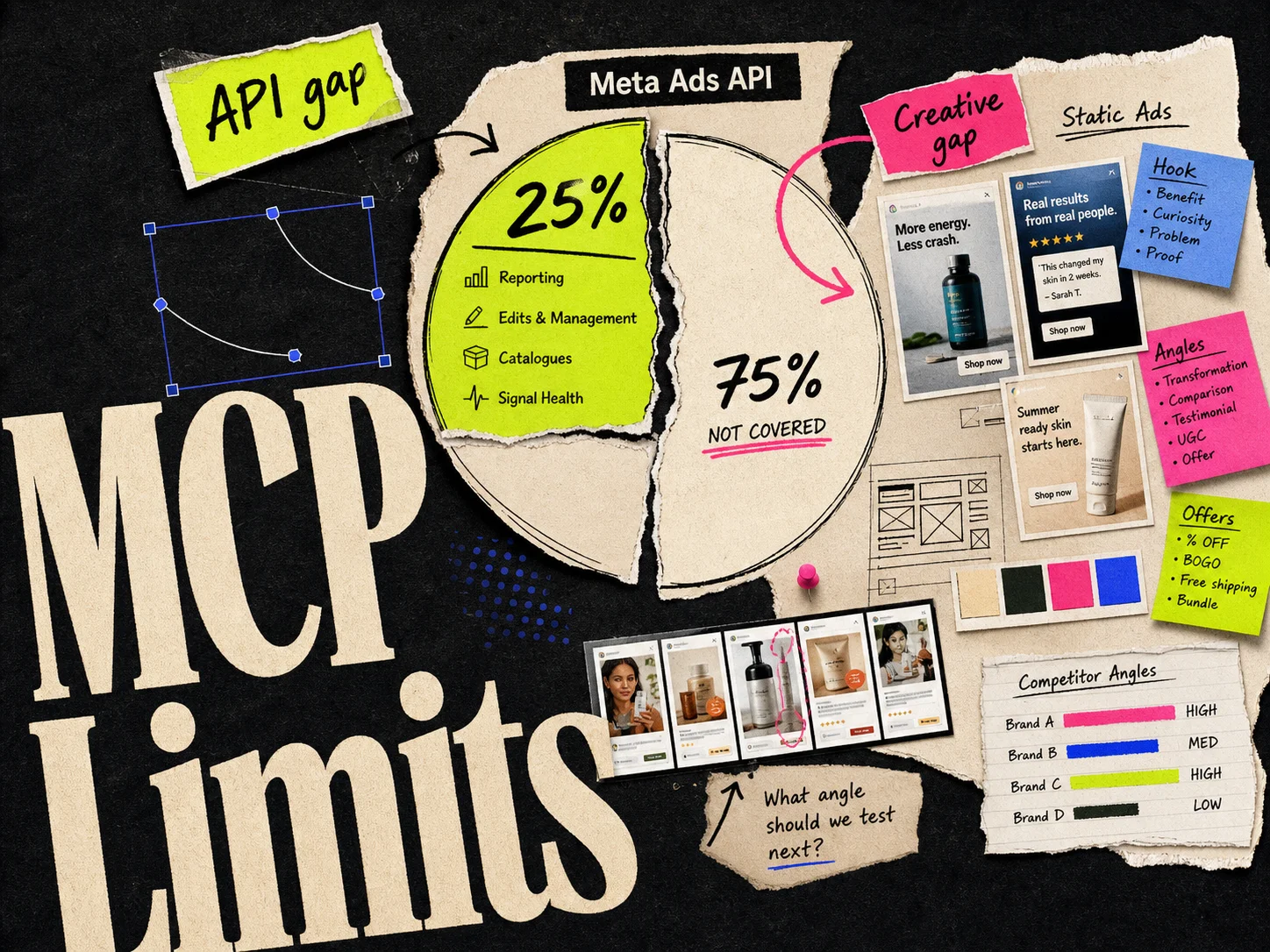
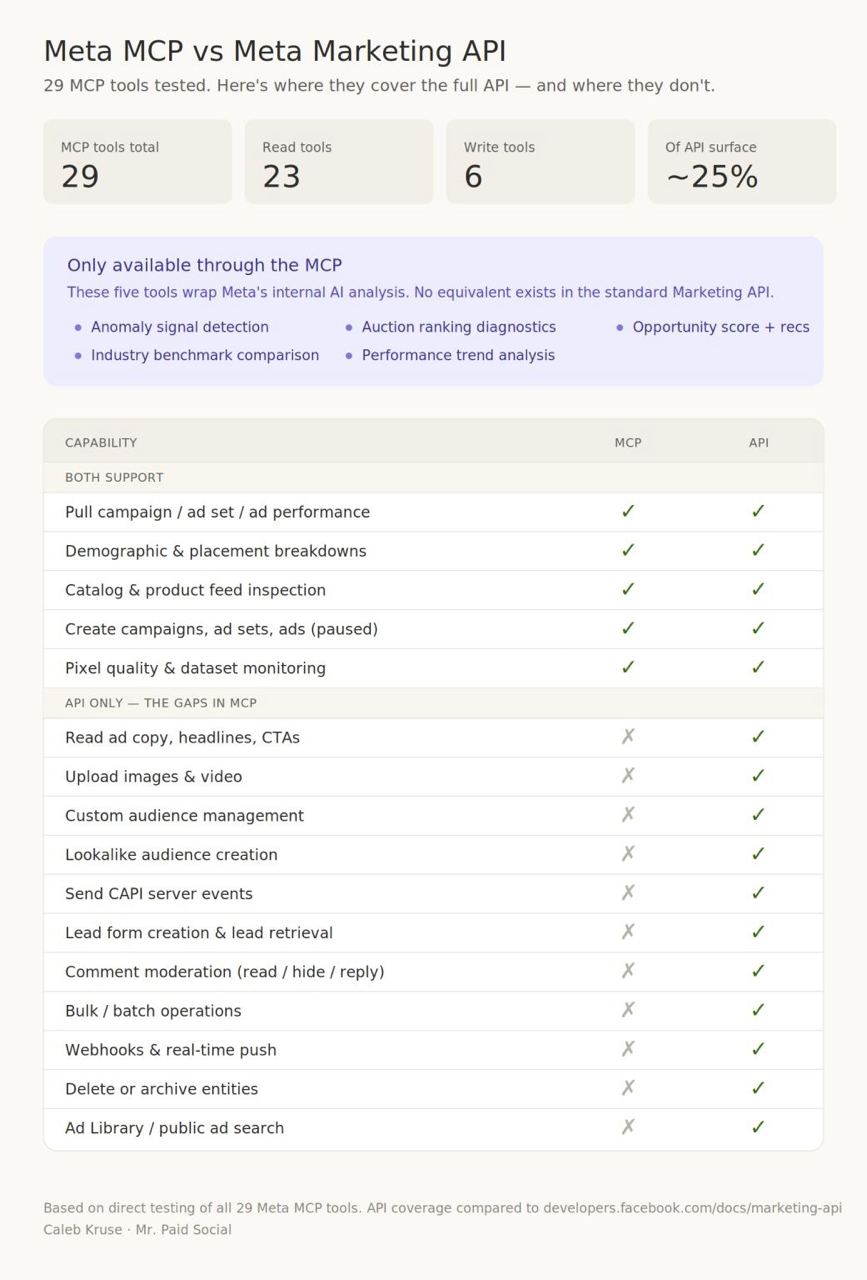
Meta Ads MCP covers roughly 25% of the useful Meta advertising workflow for most media buyers. It helps with reporting, campaign management, catalogues, and signal diagnostics. It does not cover the full API surface, does not build richer reporting UI inside the chat, and does not analyze the actual creative content beyond basic ad fields like headline, body text, and CTA.
What Meta Ads MCP is good at
Meta Ads MCP is good when the question is operational.
Use it for:
- 1.Pulling spend, ROAS, CTR, CPA, frequency, and campaign breakdowns.
- 2.Asking for quick reads on account performance.
- 3.Pausing or editing campaigns, ad sets, and ads after confirmation.
- 4.Checking pixel, Conversions API, and dataset health.
- 5.Looking at catalogues and product-related account data.
This is genuinely useful. A lot of Monday morning reporting can move from Ads Manager clicks into one prompt. The limitation is the interface: in Claude or ChatGPT, the output is usually text, bullets, and tables. That is faster than Ads Manager, but it is not the same as a purpose-built reporting UI.
For setup steps, use the Meta MCP URL and setup guide.
What Meta Ads MCP does not cover
The weak spot is creative.
Meta Ads MCP can work with ad objects and fields. It can see things like campaign structure, spend, delivery, headline, body copy, CTA, and performance metrics. That is not the same as understanding the ad.
It does not really answer questions like:
- Is the product clear in the first second?
- Is the layout readable on mobile?
- What proof type is this ad using?
- Is the hook visual, copy-led, offer-led, or review-led?
- Which competitor angle is this closest to?
- Which parts of the image are doing the selling?
- What should we make next based on this creative pattern?
Those are the questions that decide the next batch of ads.
Why 25% is still valuable
Saying Meta Ads MCP covers about 25% of the useful workflow is not an insult.
Before MCP, a media buyer had to click through Ads Manager, export reports, filter campaigns, check breakdowns, and manually compare changes. Now a lot of that can happen in Claude or ChatGPT.
It just does not close the creative loop. The MCP can tell you a creative is fatigued. It cannot look at the image, understand the hook, compare it to your competitors, and create the next stronger static ad.
The missing layer: creative understanding
Meta's API knows a lot about delivery. It knows spend, clicks, impressions, purchases, campaign structure, account setup, and diagnostics.
But paid social performance is not only delivery data. It is also creative content:
| Layer | What needs to be understood |
|---|---|
| Copy | Hook, body text, offer, CTA, claim strength |
| Visual | Product treatment, layout, color, hierarchy, proof |
| Angle | Pain point, outcome, comparison, objection, review |
| Context | Competitors, past tests, brand rules, customer language |
| Result | Spend, CTR, CPA, ROAS, fatigue, comments |
Meta Ads MCP helps more with the last row than the first four. That is why most teams still need a creative system next to the MCP.
Use Adrio alongside Meta Ads MCP
Adrio is built for the parts Meta Ads MCP does not solve well: reporting UI, creative understanding, and creative production.
The MCP can read account data. Adrio can turn performance reads into charts and other generated UI inside the chat, so the answer is easier to inspect than a wall of text or a table.
Adrio also goes deeper on the ad itself. It can analyze the creative content, not only the headline, body, and CTA. That means looking at the layout, visual style, offer framing, proof type, product treatment, colors, and competitor pattern behind the ad.
Adrio is built to cover more of the workflow around the API. The goal is not just to pull a report. The goal is to show the data clearly, track competitors, understand what angles are moving, generate new static Meta creatives, learn from results, and recommend the next batch.
Use the MCP when you need basic account operations in a general chat tool.
Use Adrio when you need reporting you can actually read, plus the creative analysis and production layer that comes after the report.
The clean workflow looks like this:
- 1.Use Adrio to inspect performance with generated charts and UI.
- 2.Use Adrio to analyze the creative pattern behind the result.
- 3.Generate new static Meta ad variants from the winning or missing angle.
- 4.Launch the next batch.
- 5.Feed the results back into the next creative decision.
That is the loop most teams actually need.
Meta Ads MCP vs Adrio
| Job | Meta Ads MCP | Adrio |
|---|---|---|
| Pull campaign performance | Yes | Yes, with generated charts and UI |
| Pause or edit campaigns | Yes | Yes |
| Check signal health | Yes | No |
| Analyze creative visuals | Limited | Yes |
| Understand angles and proof types | Limited | Yes |
| Track competitor creative patterns | Limited | Yes |
| Generate new static Meta ads | No | Yes |
| Recommend what creative to test next | Limited | Yes |
This is not an either/or decision for everyone, but the split is clear. MCP is a general chat interface for account operations. Adrio is a Meta ads workspace with reporting UI, creative analysis, and creative production.
What to ask Meta Ads MCP
Use MCP prompts for account questions:
Which campaigns had CPA increase more than 20% in the last 7 days?
Which ads have frequency above 3.5 and CTR down more than 15%?
Break down purchases by age, gender, and placement for the last 30 days.
Are there any pixel or Conversions API issues right now?
These are good MCP questions because the answers live in account data.
What to ask Adrio
Use Adrio for creative questions:
What visual pattern is this competitor repeating?
Which of our ads use review proof, and which angles are missing?
Generate static Meta variants from this competitor structure using our product.
Which hooks should we test next based on what worked and what failed?
These are creative judgment questions. They need more than the API fields.
Questions about Meta Ads MCP capabilities
What does Meta Ads MCP do?
Meta Ads MCP lets Claude, ChatGPT, and other MCP-compatible tools connect to your Meta ad account. It can pull reports, read performance, edit campaigns, manage catalogues, and check signal health through chat.
Does Meta Ads MCP cover the full Marketing API?
No. Meta Ads MCP exposes a useful subset of the Marketing API, but it does not cover the full API or the full advertising workflow. For most media buyers, it covers roughly 25% of the workflow: account operations and diagnostics.
Can Meta Ads MCP analyze ad creative?
Only in a limited way. It can work with fields like headline, body text, CTA, campaign structure, and performance data. It does not deeply analyze the image, layout, product treatment, color, proof type, or competitor pattern.
Can Meta Ads MCP create new ads?
It can help create or edit ad objects if you already have the needed assets and approve the action. It does not design new creative, generate static ads, or decide what visual angle to test next.
How does Adrio compare with Meta Ads MCP?
Meta Ads MCP helps with account data and operations inside a general chat tool. Adrio covers more of the workflow: performance reporting with generated charts and UI, creative analysis beyond headline/body/CTA, competitor pattern tracking, static ad generation, and next-test recommendations.